Platform decisions
WordPress vs Squarespace for a growing business
Choose the platform your team can operate and your business can grow with. The right answer depends on workflows, integrations and ownership.

The WordPress vs Squarespace decision starts with the work your team needs to do: edit pages, connect services, handle enquiries and keep the website running. Compare those tasks on a realistic page before comparing feature lists. The better fit depends on the workflow, access and ongoing responsibilities you can support.
This guide compares self-hosted WordPress with Squarespace's hosted website service. WordPress.com is a separate hosted offering with its own plans and constraints. Treating every WordPress product as the same service makes cost and responsibility comparisons misleading.
Start with a normal working week
List the recurring jobs: editing a service page, publishing a post, adding a team member, changing a form and checking an enquiry. Ask the people who will do those jobs to try representative tasks before a platform decision is final.
For a small consultancy that mainly updates text and photographs, a hosted editor may fit well. For a property business with an established listing feed and custom lead routing, integration requirements may drive the decision. Neither example means all businesses in that sector need the same platform.
Try three ordinary tasks on a preview: change a service paragraph and photograph, check the page on a phone, and confirm a form submission reaches your own test address. Have the person who will maintain the site do the edit. Record where they need help and which connections require custom work. That is a more useful comparison than the demo homepage alone.
Compare who is responsible for the moving parts
| Question | Self-hosted WordPress | Squarespace |
|---|---|---|
| Hosting and platform operations | Choose a host and agree what it manages | Part of the hosted platform relationship |
| Extensions and custom work | Theme/plugin choices need compatibility and maintenance ownership | Check supported integrations and plan-specific customisation |
| Routine editing | Depends on the editor and how the build is configured | Depends on the selected site features and editor workflow |
| Moving away | Plan files, database, licences and external connections | Check exactly which content exports and what needs rebuilding |
These are setup questions, not a claim that either platform removes every maintenance task. Account access, domain renewal, content accuracy and the working enquiry journey still need an owner.
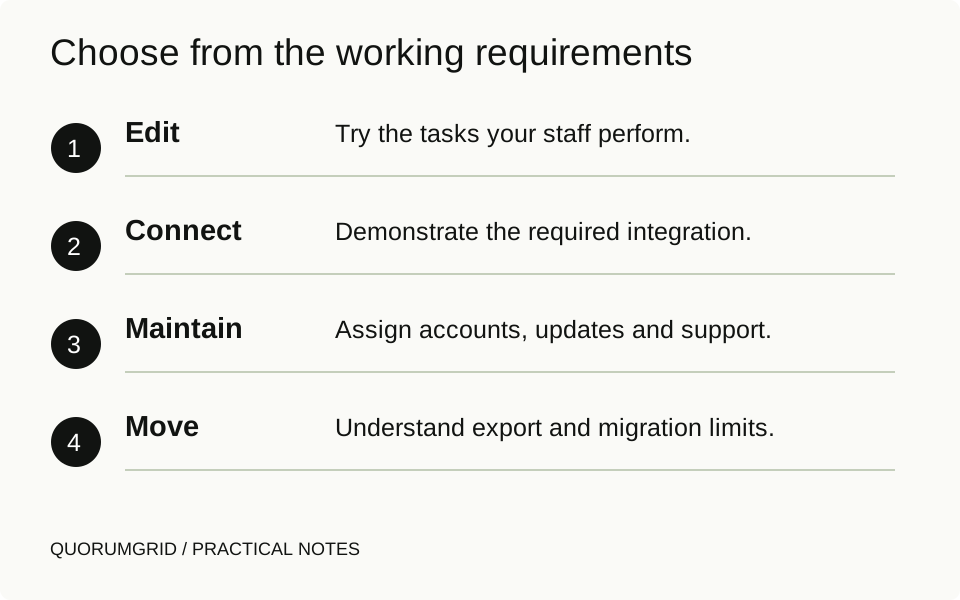
Choose from the working requirements
- Edit
Try the tasks your staff perform.
- Connect
Demonstrate the required integration.
- Maintain
Assign accounts, updates and support.
- Move
Understand export and migration limits.
Test the integration you actually need
Write the requirement in terms of behaviour. “Connect the CRM” might mean forwarding a form email, creating a contact through an API, preserving campaign attribution or synchronising records in both directions. Those are different jobs.
For WordPress, investigate the relevant extension, its supported versions, licence and update path. A plugin catalogue entry is not proof that a specific connection works in your setup. Custom code adds responsibility for testing and maintenance.
For Squarespace, check the current supported integration and custom-code options for the proposed plan. Do not assume that a code snippet gives unrestricted access to the platform's internal server behaviour. Ask the supplier to demonstrate the exact workflow before treating it as included.
Compare a complete operating budget
Include the build, hosting/platform subscription, extensions, domain, ongoing support and any external services. Use the same planning period for both proposals. Compare equivalent work: a custom design, content migration and integration testing do not become free because the underlying software is available without a licence fee.
For an illustrative comparison, list each recurring item and its renewal owner, then ask which tasks your staff must perform. The time spent arranging updates or repairing a broken connection is part of the operating decision even when it does not appear on the platform bill.
Prices and plan entitlements change. Check the provider's current quote for your country, billing term and required features rather than relying on an old price table in a comparison article. Our redesign cost guide helps separate scope from the underlying subscription.
Check the exit before the entrance
Ask what you can take with you and in what form. Squarespace's export documentation explains that only certain content can be exported. An export is not a transfer of the entire design, every feature and every integration.
WordPress's content export is also different from a full backup. For a self-hosted move, account for the files, database, uploads, configuration and external services described in the backup guidance.
Keep control of the domain and a usable access inventory. Before any migration, check representative pages and business functions on the proposed destination. Budget for redirects when URLs change, and do not promise a move with no possibility of search fluctuations.
A decision you can explain to the team
Choose a short list of non-negotiables and test them. A hosted setup may be a good fit when the available features cover the business and the team values a managed platform. Self-hosted WordPress may be a good fit when its editing, extension or custom-development options meet a requirement the team is prepared to maintain.
Record the trade-offs you accept. If the decision needs a custom integration, name its owner and validation method. If a migration would be expensive, keep that visible rather than describing either option as having no lock-in.
The strongest proposal explains why the chosen setup fits your working requirements. A long list of features cannot make that decision for you.
Sources and further reading
Technical references for this guide. The checklists and examples are our practical recommendations, adapted to the subject.